
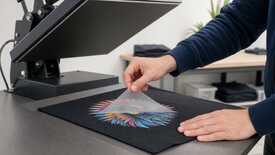
If the DTF film lifts the print from the fabric during peeling, stop immediately and do not pull the carrier any farther. Do not continue the production run until you have checked the peel mode for that specific film against the manufacturer's current instructions and obtained a clean result on a new control sample. Do not guess when to peel or change temperature, time, and pressure at the same time.
The manufacturer defines the peel mode for each film
Hot-peel and cold-peel DTF films have different instructions.
This is an example from the HEXIS technical sheets, not a set of parameters for every DTF film: there is no universal rule to "peel immediately" or "wait."
Match the exact name and batch on the roll and packaging to the current instructions. Interpret labels such as Hot Peel, Cold Peel, Instant Peel, or Hot/Cold only together with the conditions the manufacturer sets for that material. If the label is missing or contradictory, or the instructions cannot be confirmed, do not test a guess on a production run.
A control sample determines whether the run can proceed
Reproduce the production combination: use a scrap of the same fabric, the same film, inks, powder, and press.
Start with the parameters specified for that film and fabric. If the instructions allow adjustment, change only one of the three parameters in each test: temperature, time, or pressure.
At the point specified by the manufacturer, lift the edge of the carrier only far enough to see whether the image stays on the fabric. If the print moves with the film, stop.
If the edge releases cleanly, finish peeling the control sample. Inspect fine details, edges, and solid areas: the entire image must remain on the fabric.
A second failed test stops the production run
Resistance during peeling does not prove that the cause is temperature, time, pressure, powder, or fabric. Do not conclude that a film should be peeled cold merely because one sample happened to release after cooling; likewise, do not start peeling a Cold Peel film while the carrier is hot.
If a new control sample using the confirmed mode also fails the check, do not start the production run. Set aside any unlabelled or mixed film, record the materials and test conditions, and give those details to a technical specialist or the supplier.
A clean peel verifies only this stage
Your next film should have a clearly specified peel mode
When purchasing film, look beyond the word "universal" and check the exact material name, current instructions, and a clearly specified mode.
Check MyPrint DTF film with a specified peel typeBefore production, compare the peel type with the packaging for the specific batch and keep the instructions for the operator.